Tailgate BooksBooks, as you go.

You do hard things all day. Your books shouldn’t be one of them.

Tailgate Books is the estimate, the invoice, the receipts, the mileage and the taxes for a one-person business, kept in a few minutes a day, from your phone, in English or Spanish.

Start your 14-day free trial
$24.95 a month after. One plan. Cancel in two taps. Works with no signal on the jobsite.
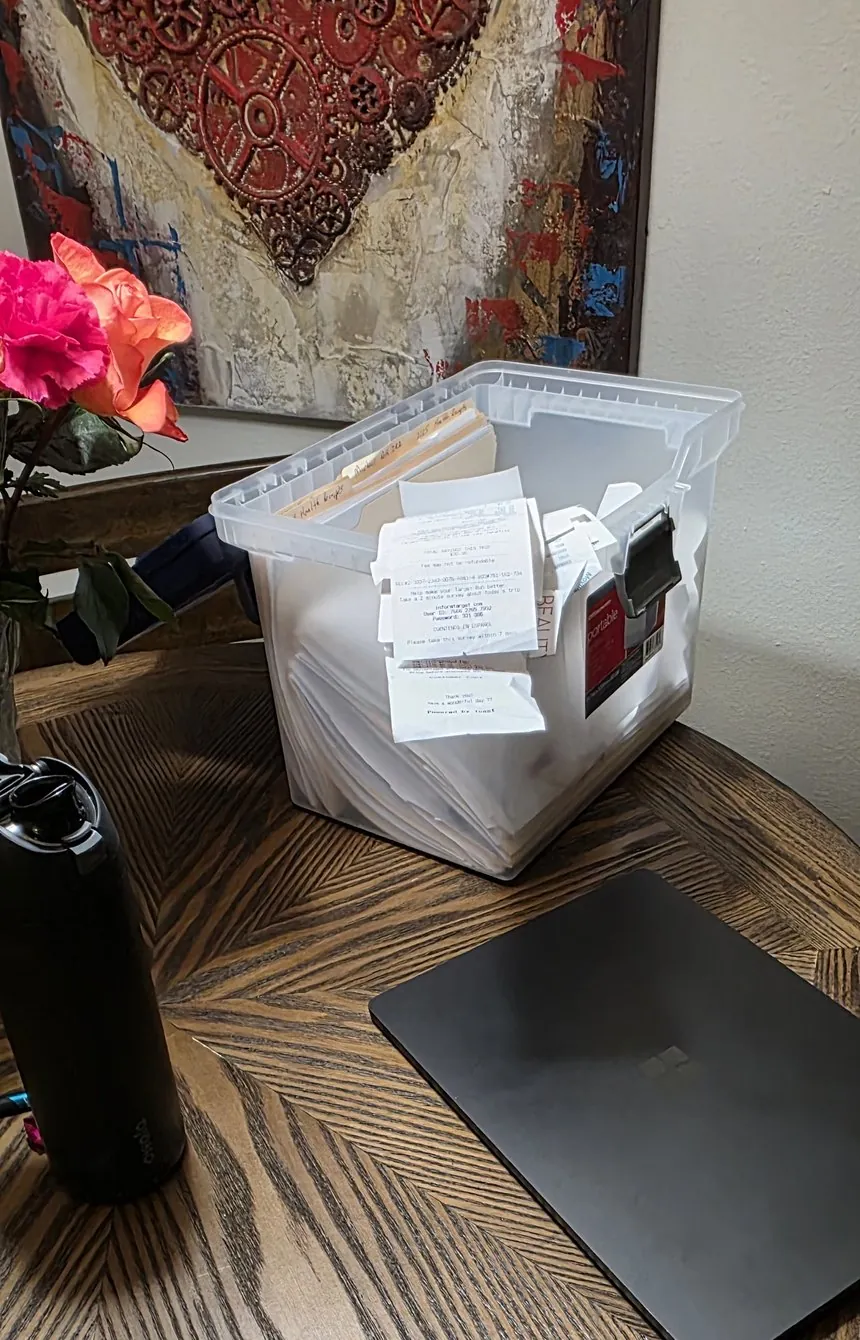
A bin overflowing with receipts and paperwork next to a closed laptop.
Long night ahead?
Books, as you go.

You didn’t get into this to do paperwork.

But the shoebox fills up. The quote never gets sent. The receipt fades in the truck door. And every April, the same knot in your stomach.

That isn’t a character flaw. Most bookkeeping software was built for entering data. Someone at a desk, typing in what already happened.

You don’t have a desk. You have a truck.

Tailgate Books is a tool, built to be used where the work happens. A minute here, a minute there, through the day. Do it a few weeks and it turns into a habit. The habit is what keeps your books.

The one habit behind all of it

A few minutes at a time. That is the whole system.

Most software makes you a bookkeeper. Tailgate Books helps you build a habit.

The money you lose in a one-person business is not lost in a big mistake. It leaks out a little every day. A receipt never filed. Miles never logged. A bill sent a week late. A job priced off a hunch.

So the app fits into moments your day already has.

Four moments a day
  1. In the morning. Open it with your coffee. The next step on each job you’re running is right there on Home.
  2. At the counter. Snap the receipt before you walk out. It reads the store, the total and the date.
  3. When you park. Tap Log miles, pick where you came from and where you are. Drive the same run again and the miles fill in.
  4. Before you head home. The close-out. File what’s left, log the hours, send what’s ready, tap Close out today.

It takes about two months. A study at University College London found a new habit takes about 66 days on average to become automatic, and that missing a single day didn’t set people back. The app works the same way. Miss a day and catch it up later that week, and it still counts. Take a day off and it doesn’t count against you.

It scores the habit, not the money. It never scores how much you made. It scores whether the books are current, because that is the part you control.

Do it for a month and three things happen. You get your nights back. You stop wondering where the business stands, because it is right there. And every estimate and invoice you hand a customer looks like a pro sent it, because one did.
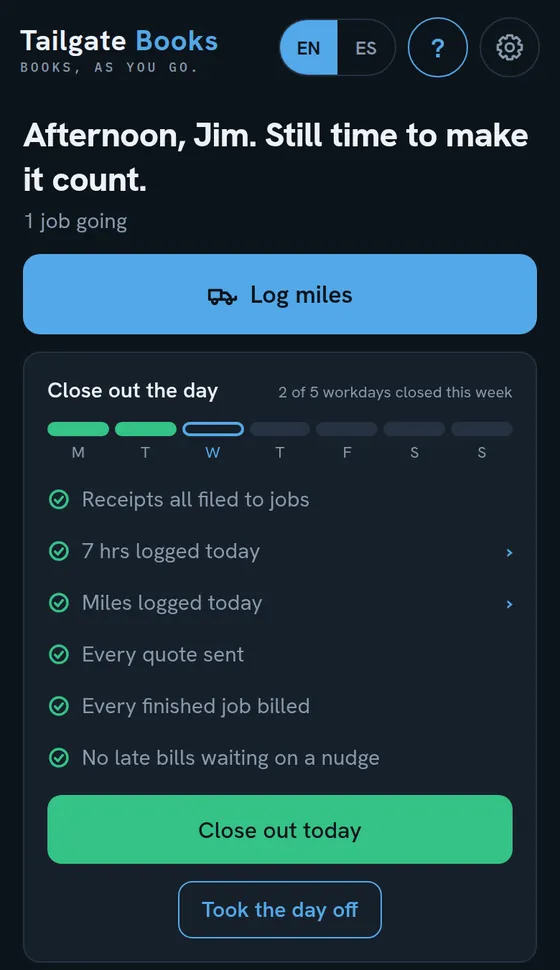
The Close out the day card on the Home screen, with receipts filed, hours and miles logged, and the Close out today button.

Start the habit tonight.

Start your 14-day free trial
14 days free. No card charged until the trial ends. Cancel in two taps.
Everything the day needs. Nothing it doesn’t.

Every job makes the next bid better

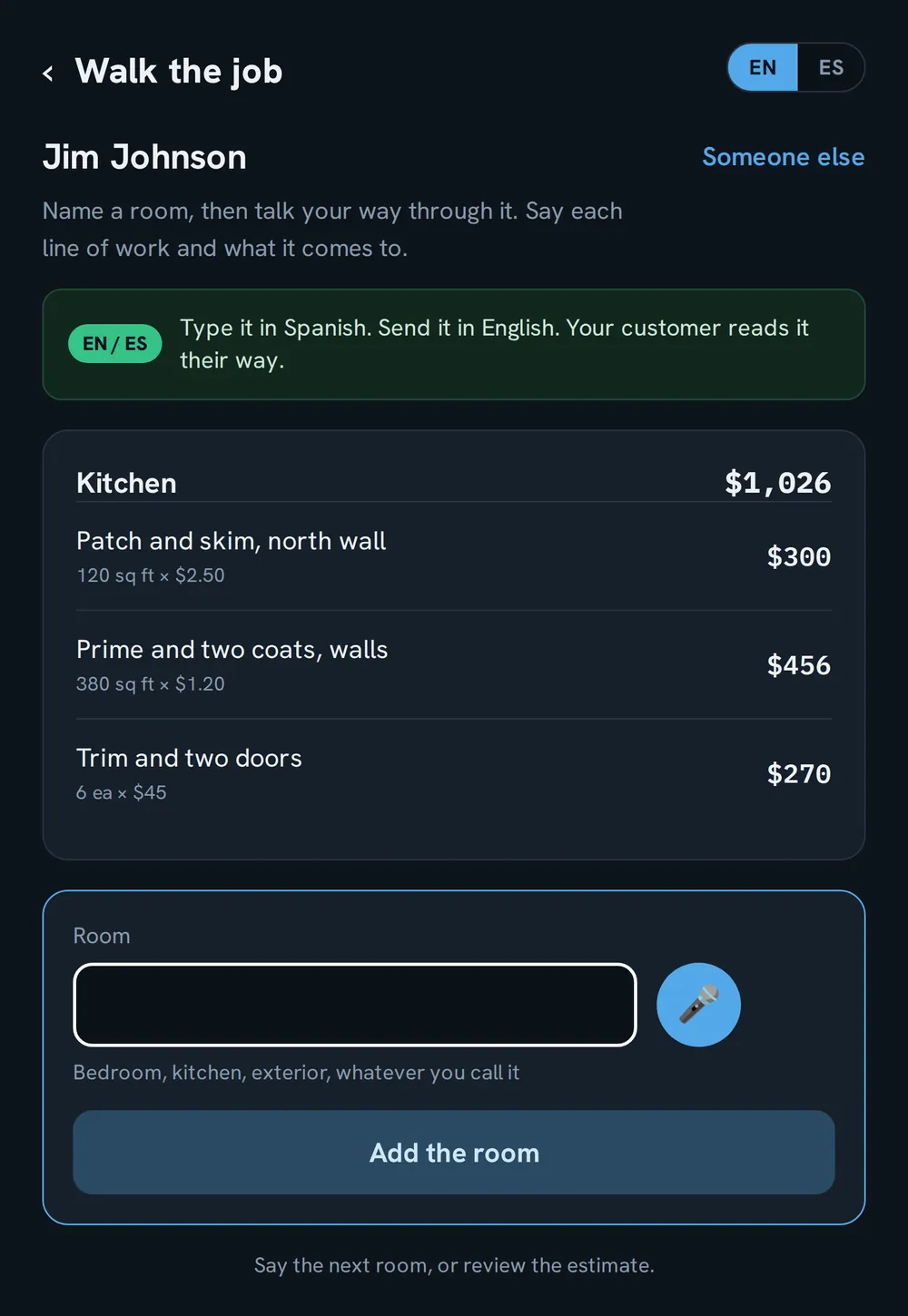
Walk the room and say the work out loud. “Three hundred square feet of masking.” The first time you say something new, the app asks what you charge for it, once, and remembers it as your rate. After that, it prices itself.

Every finished job shows what each line paid you, per hour, and what the materials on it cost. Leave yourself a note, “allow an extra hour for the stairwell,” and it shows up on your next quote. So each bid is built on what the last jobs taught you, not on a hunch.

Your customer approves and signs from a text, in their language. You are done before you pull out of the driveway.

The Walk the job screen, building an estimate room by room with priced lines for a kitchen.

Find out which jobs are quietly robbing you, by the hour

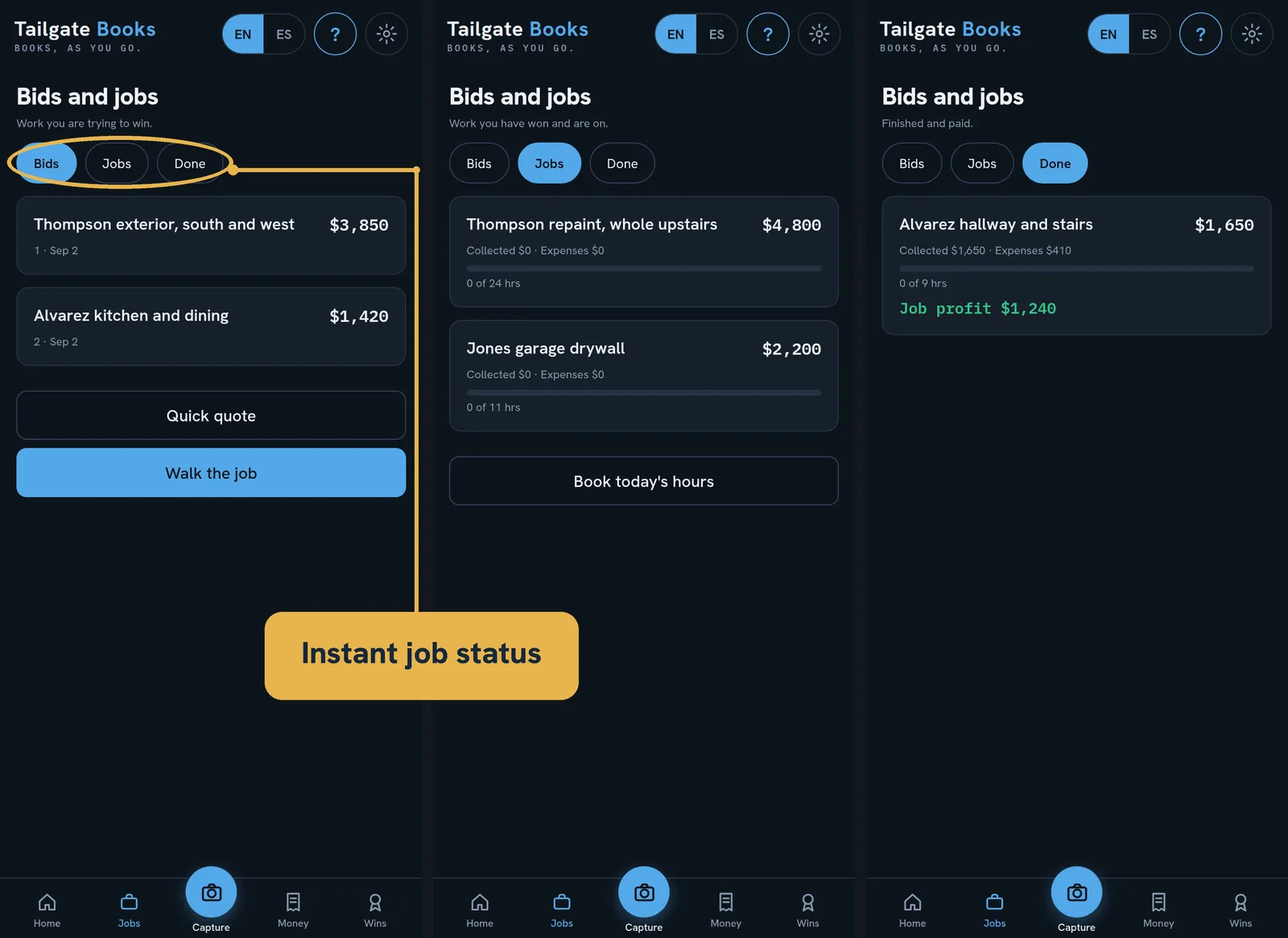
You can run flat out all year and still come up short and never know which jobs did it to you. Every job shows its profit, and every line on it shows what it paid you per hour. Now you price the next job from facts instead of hope.

Three views of Bids and jobs: open bids, jobs in progress with what was collected and spent, and finished jobs with their profit.

There is money in your account that is not yours to spend

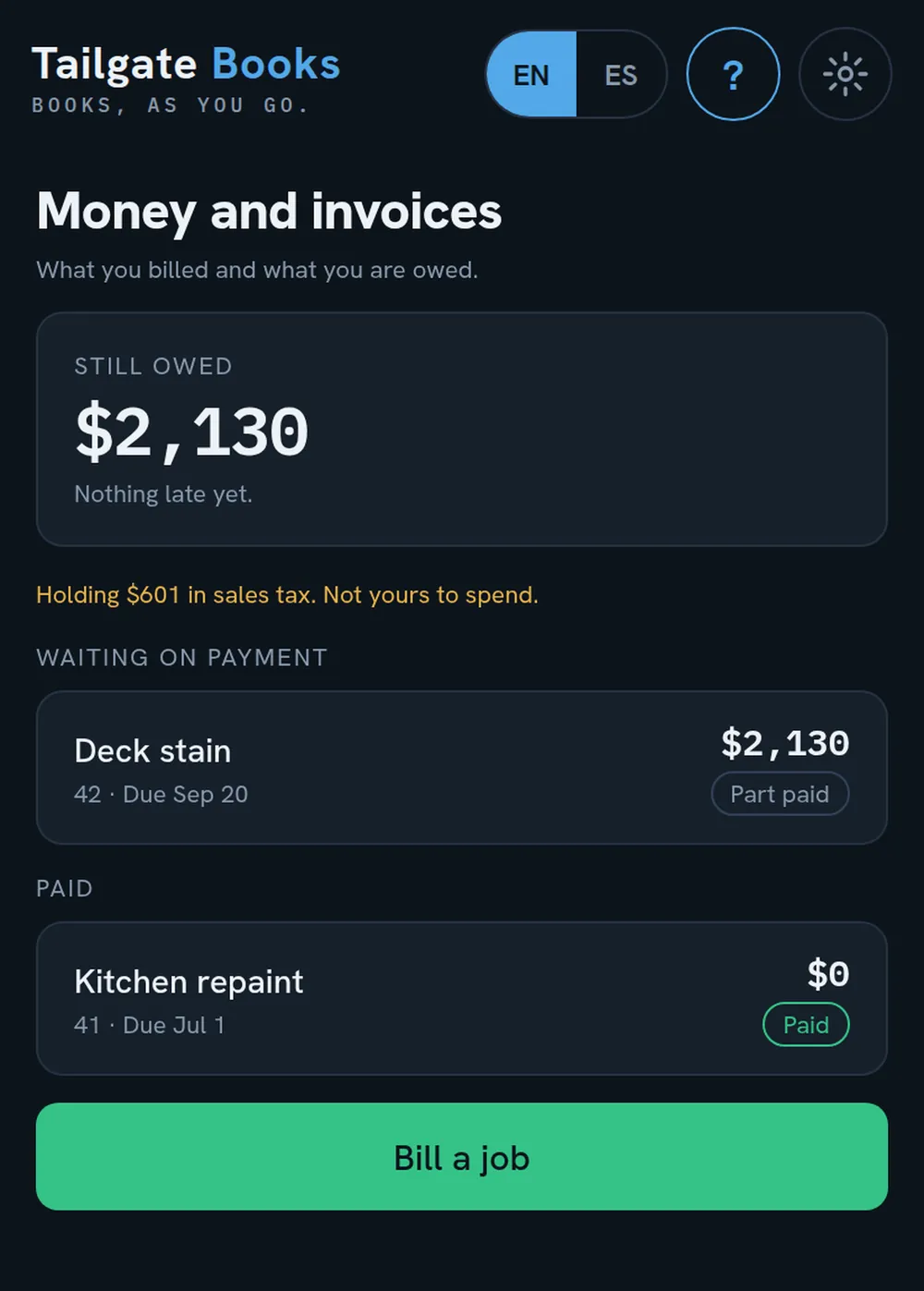
Every invoice, paid and unpaid, in one place, so you stop chasing checks you forgot about. And it tells you, to the dollar, how much of the balance sitting in your account is sales tax you are only holding for the state. Keep that exact amount parked and you will never come up short at filing time.

And when it’s time to file, pick the month or quarter. The app breaks it down by each jurisdiction, with the tax you collected for each: your sales, the part that was taxable, and the tax. Already added up.

The Money and invoices screen, with what is still owed, sales tax being held, and bills waiting on payment.

An invoice that looks like a million-dollar company sent it

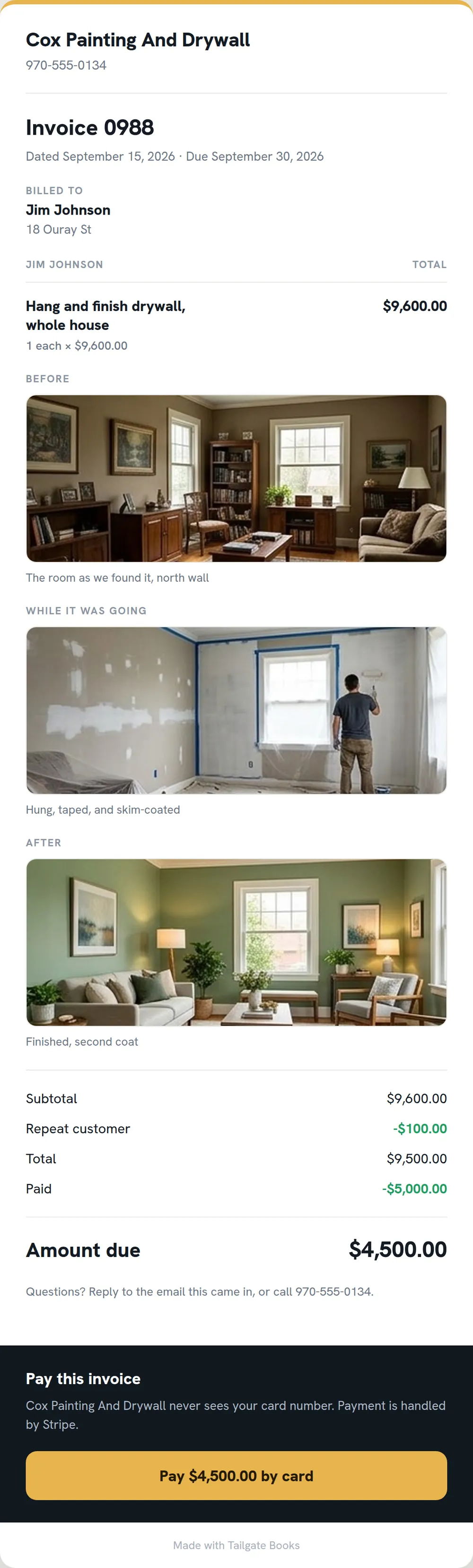
Send a clean, branded invoice with before-and-after photos and a Pay-by-card button. You get paid faster, you look like the big outfit, and your customer’s card never touches your phone. Stripe handles it and the money lands in your account.

A finished invoice with before and after photos of the work and a Pay by card button.
The price you agreed stays agreed

"Can you just throw in the closet while you're here?"

You know where that goes. Free work, a fuzzy price, and a customer who remembers it differently at the end.

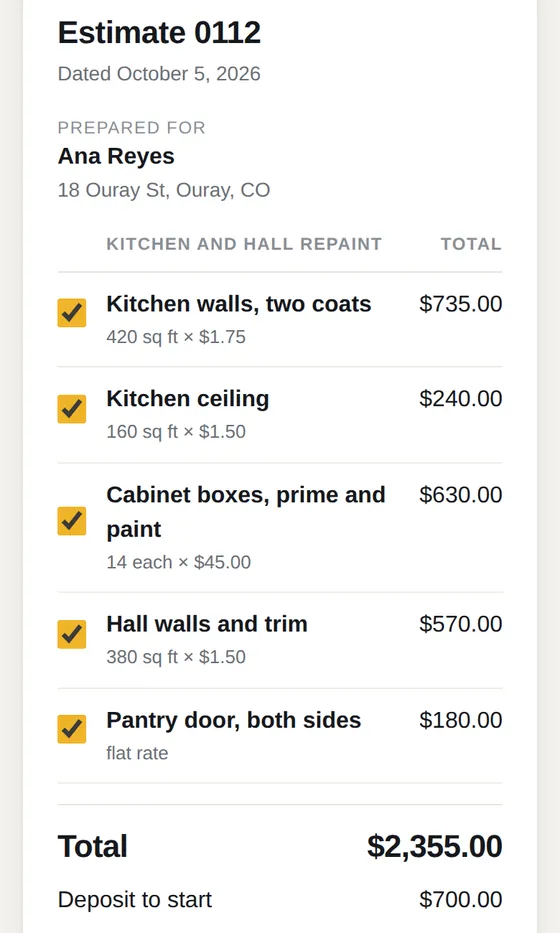
  • They sign on their phone. No app, no login, in their language. They type their name, and that is the signature.
  • They pick the lines they want. Offer the extras as optional. Their name approves exactly what they ticked, and a copy is kept as it read that moment.
  • A yes on the phone counts. Record it as a verbal yes, who and when, and the job can start.
  • Extra work gets its own change order. Add something to a job and the app asks if the customer asked for it. If yes, a numbered change order gets it priced and approved before you start it.
  • You know when they opened it. Sent, viewed, paid. No more "I never got it."
A customer estimate on a phone, with each line ticked to approve.
Selling at the kitchen table

Close the deal in their home without the legal knot.

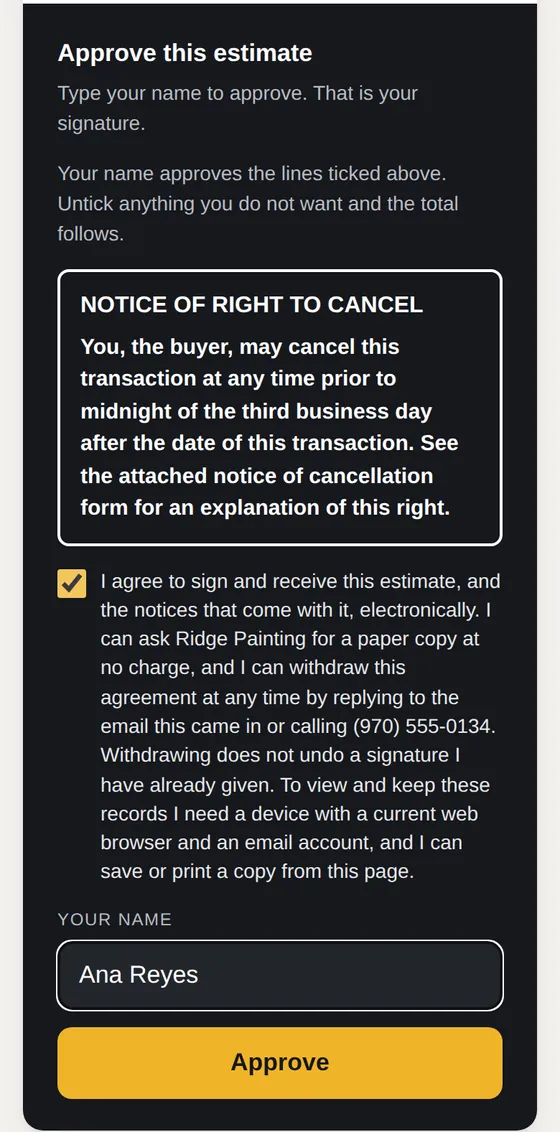
Sell a job in the customer's home and the law gives them three business days to change their mind. Do you have the notice you are supposed to hand them?

Flip one switch for an in-home sale. The app puts the cancellation notice right by the signature, in the customer's language, works out the last day to cancel, and holds the deposit button until that day has passed. When you have their email, they get a copy of what they signed.

You sell. The paperwork is already right.

The approval box on an in-home sale, with the notice of the right to cancel above the signature.

Look like the big outfit on the next job you quote.

Start your 14-day free trial
14 days free. No card charged until the trial ends. Cancel in two taps.
Fast in the truck. Serious at the desk. One set of books.

The same books, open on your phone at the jobsite and on the computer when it is time to sit down and hand your accountant the year. Fast in the truck. Thorough at the desk. You never enter anything twice.

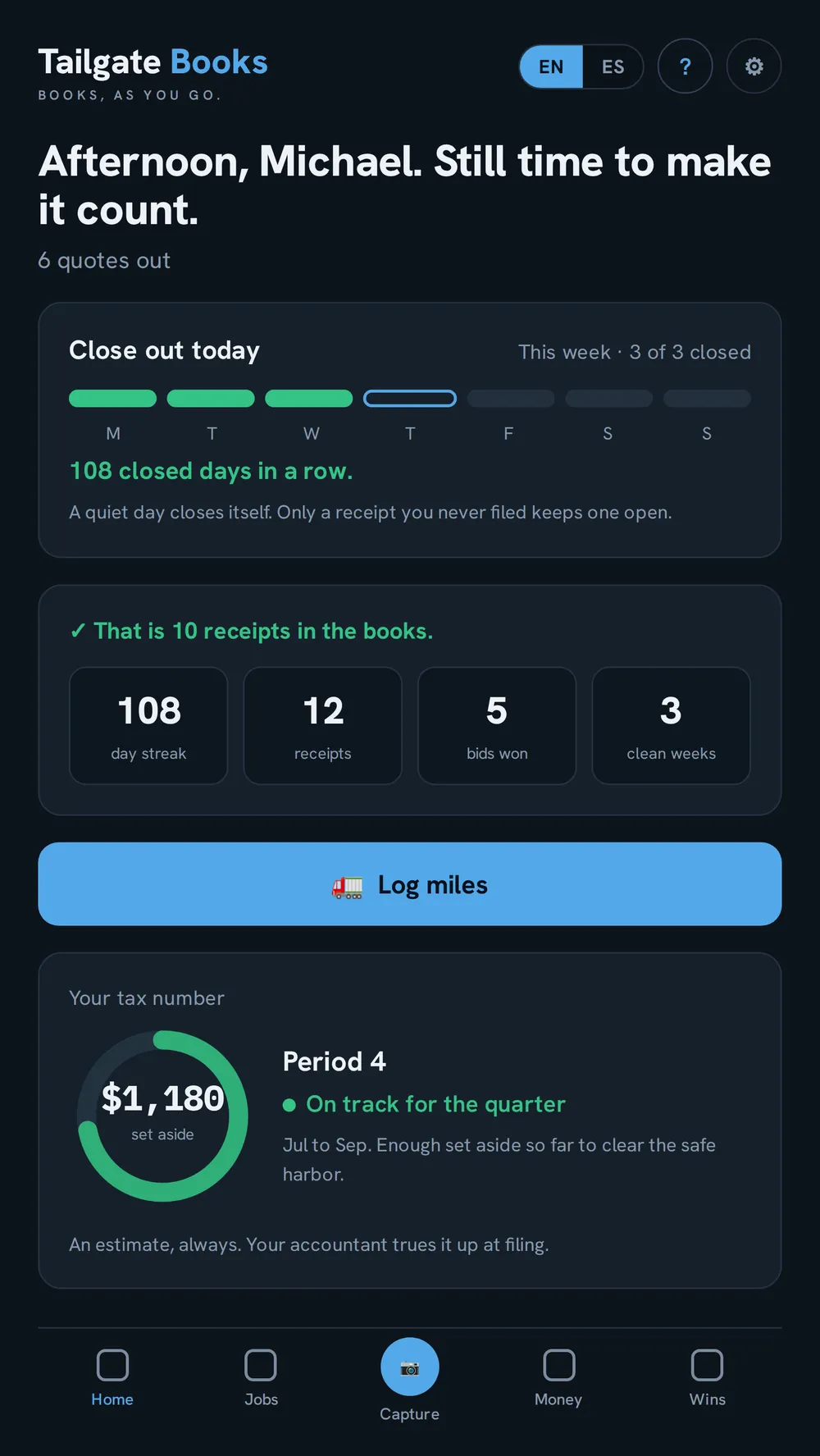
The Home screen on a phone, with Close out today, a Log miles button and the tax ring.
On the phone: a few minutes, one thumb.
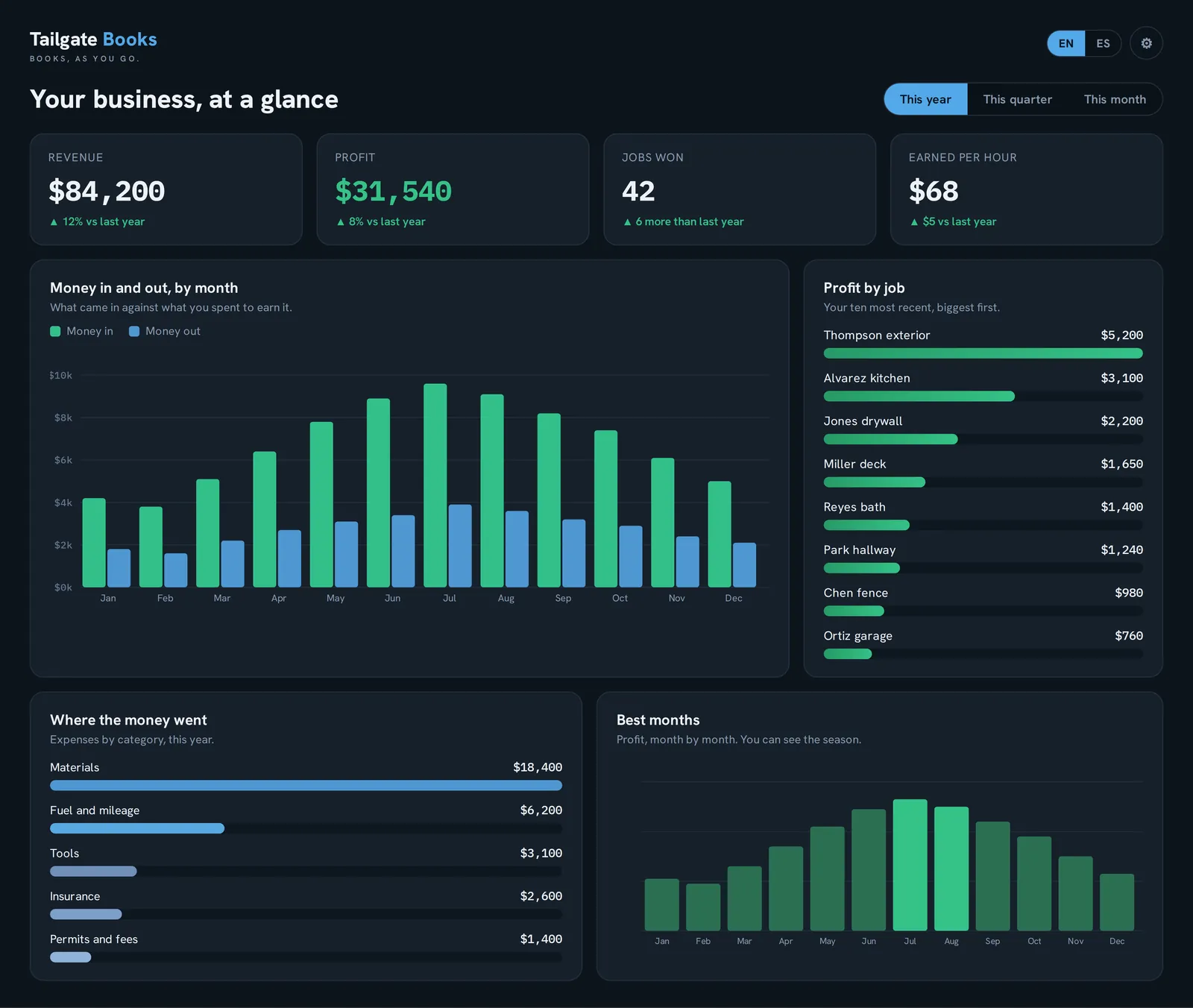
The desktop view: revenue, profit, money in and out by month, and profit by job.
On the desktop: your whole business in one place.
An AI-generated illustration of a dog walker on a tree-lined street walking four dogs.

It knows a painter quotes rooms and a groomer quotes pets

It should talk the way you do. Pick your trade when you sign up and the whole app does, from the first screen. More than fifty trades, and if yours is not on the list, you type it and it still fits.

Painter
+ Room
Walk the house and quote it room by room, out loud.
Cleaner
+ Area
By the area. Kitchen, baths, floors, done.
Landscaper
+ Zone
By the zone. The front, the back, the beds.
Pet groomer
+ Pet
By the pet, by name. Bella, Max, Cooper.
Photographer
+ Session
By the session, so a whole shoot is one clean line.
Locksmith, mover, dog walker
Straight to the line
Nothing to name first, because you are not grouping anything.
Something else?

Type what you do and it still fits. It even reads your own word for the work, so if you call them bays, the app says bays.

Use what you need. Turn off the rest.

Built for your trade from the first screen, and you can shape it further. Don’t do quotes? Turn them off, and change orders go with them. No job photos, no materials, no sales tax? Off. Don’t want the Friday paper or the daily reminder? Off. What’s left is only what your business uses.

And every trade, in English or Spanish, on every screen and every estimate your customer signs.

On the job

Your list for the job. Said out loud. Checked off with a thumb.

One place to come back to, all day. That is how the habit forms: you stop keeping the job in your head, on a sticky note and in three text threads, and keep it here.

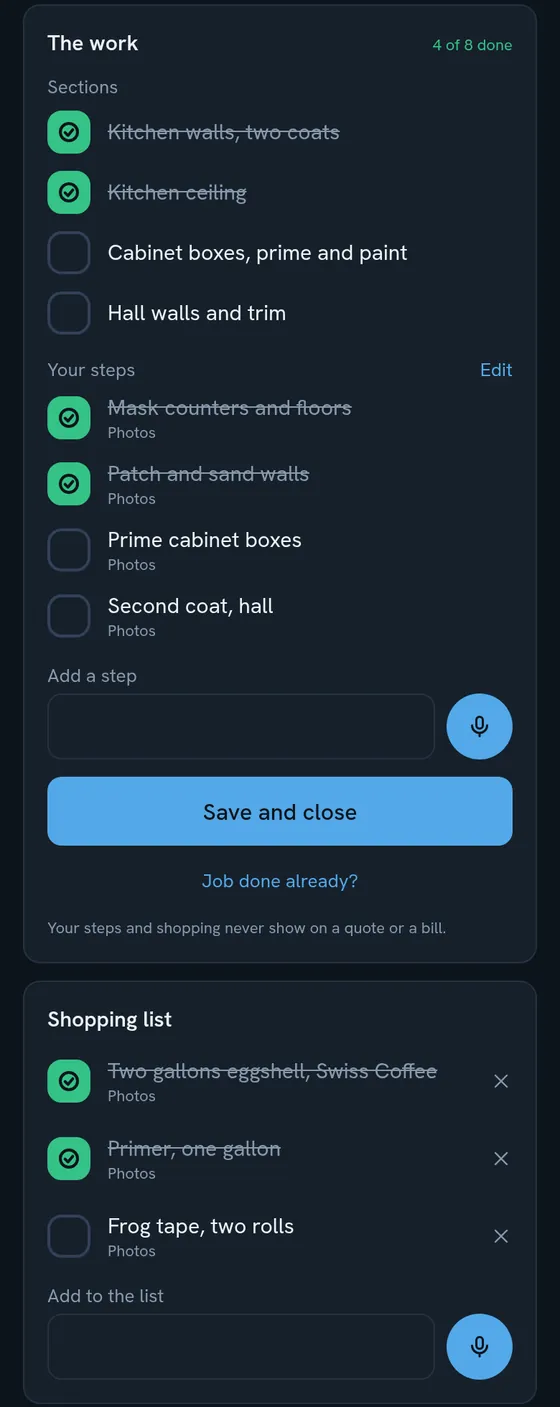
The sections you quoted become your checklist. Add your own steps if you want them.

  • Say your steps. "Pick up paint, next mask, next prime." Say "next" between them and the list builds itself.
  • A shopping list for every job. Checked off at the store, and it catches the supplies you forgot to price.
  • Save a list once. The next job like it is one tap.
  • A note for next time. "Allow an extra hour for the stairwell." It shows on your next quote for that customer. Only you see it.
  • Job done, bill sent. Check the last box, tap Job done, and the bill is one tap away.
A job checklist with the quoted sections, your own steps and a shopping list, some checked off.
Receipts, miles and the deductions you were losing

The deductions you lose are not complicated. They are just not written down.

The receipt that faded in the truck door. The supply run on your personal card. The forty miles to an estimate you never logged. Every one of them was a deduction. None of them made it to April.

Snap it or forward it

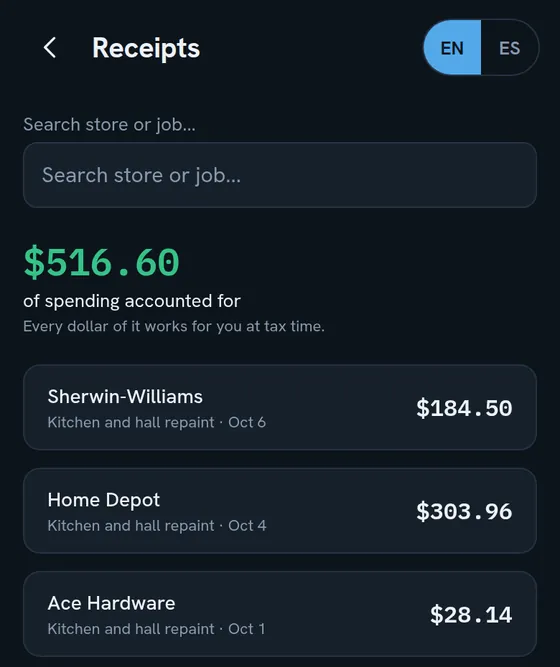
Take a photo and the app reads the store, the total, the date and the category. Supplier emails you receipts? Forward them to your own receipt address and they file themselves. Paid on the personal card? Doesn't matter. The receipt is what proves what you bought, so the receipt is what goes in your books.

Miles in one tap

Tap the big button on Home. The IRS rate for the day you drove is filled in. Trips logged as you drive them are the kind of record the IRS asks for, and every one rides into your books at the right rate, even after the rate changes.

The receipts list, each one filed to a job, with the total of spending accounted for.
Taxes without the April knot

A number every week. Not a surprise every April.

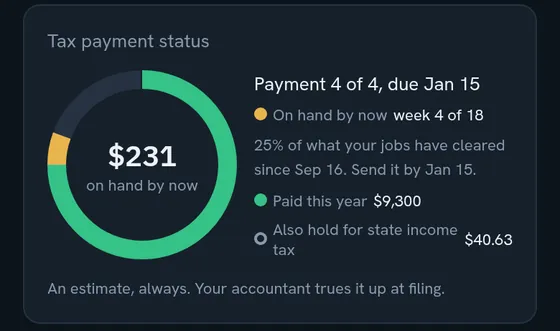
The tax ring on your Home screen shows what to set aside this quarter to hit the IRS safe-harbor target, measured against last year's tax the way the rule counts it, and breaks it down to a number per week.

Your state's income tax is held apart in its own line, so a payment to the state never makes the federal side look further along than it is. Sales tax you collect sits in its own pile too, because it was never yours to spend.

None of it is tax advice. It is the number your accountant will ask about, already worked out.

The tax ring, showing what is on hand by now, what was paid this year and what to hold for state income tax.
Your CPA will love you

Walk into your CPA's office with the year already done.

A good CPA is worth every dollar. Paying one to sort a shoebox is not.

Pay that CPA to help plan your future dreams!

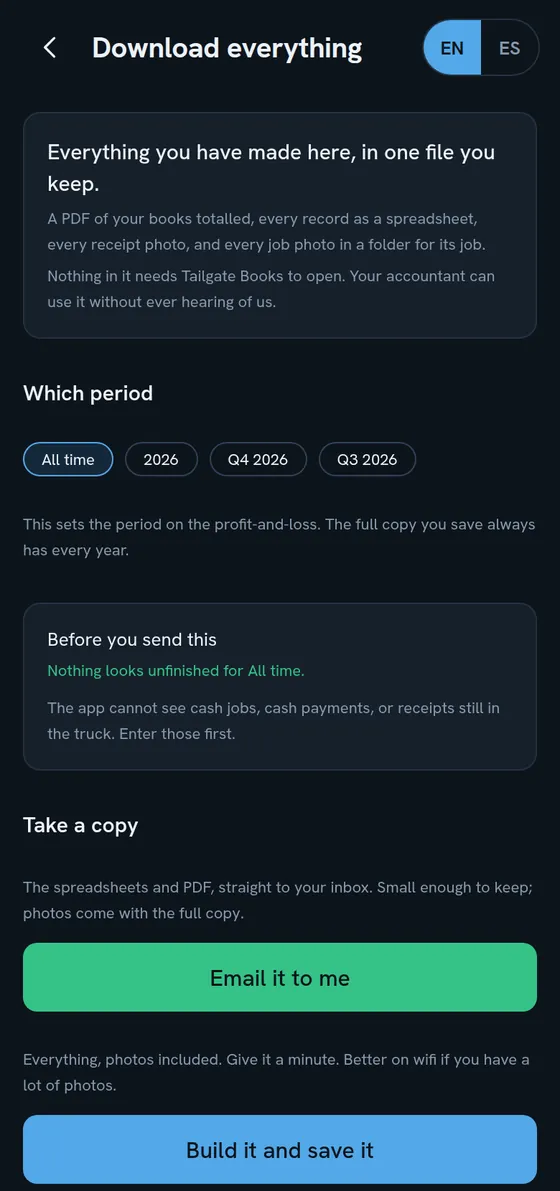
One tap downloads your whole year in one file: income, expenses with every receipt, mileage, sales tax, and the items you flagged to ask about. Spreadsheets they can open without ever hearing of us, plus a full-history PDF.

Shorter appointment. Smaller bill. More deductions found, because they were captured the day they happened.

The Download everything screen, with a period picker and buttons to email it or save the whole file.

This April, walk in with the year already done.

Start your 14-day free trial
14 days free. No card charged until the trial ends. Cancel in two taps.
The pat on the back nobody gives you

Every Friday at 6 pm, your business makes the paper.

Every big outfit started as one person with a system. Systems are what turn a one-person business into a business that runs without running you. The time to start yours is today.

Work alone and nobody tells you that you had a good week. So the app does.

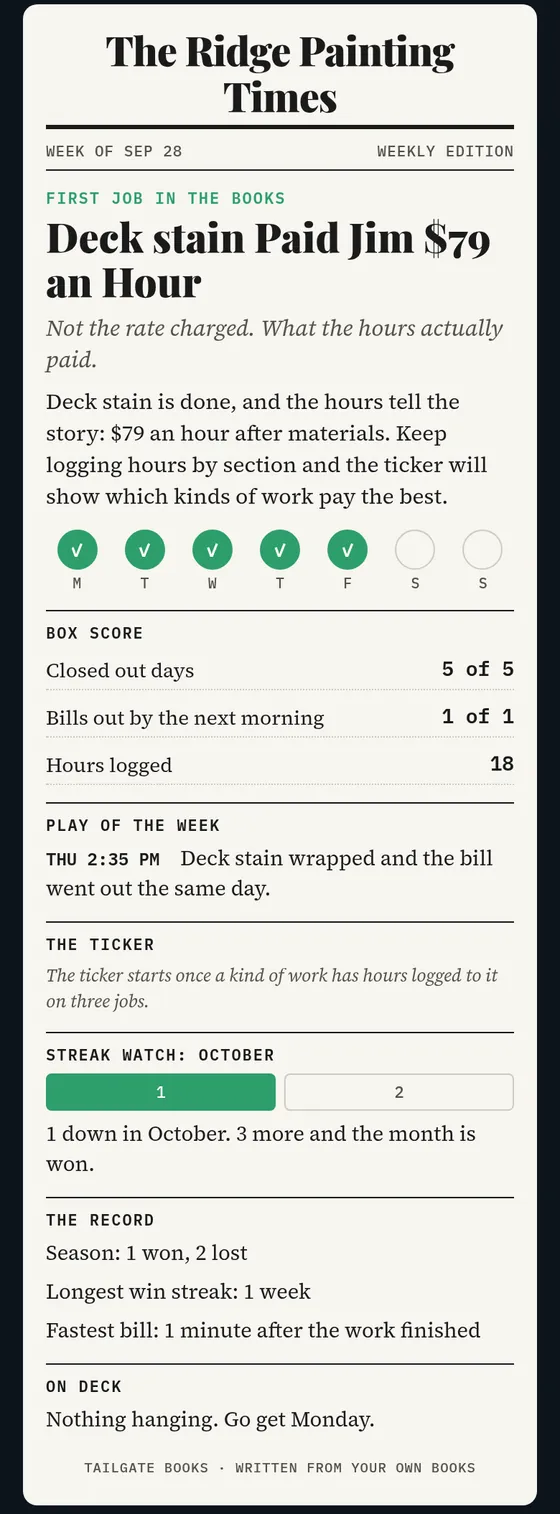
The News tab prints a weekly paper named for your business, written from your own books: the jobs you finished, the bills that went out, the days you closed out, and what your work really paid by the hour.

It never cheers a big sale. It cheers the habit. Back issues are kept, you can share an edition, and if it is not your thing, it switches off.

A sample weekly paper, The Ridge Painting Times, with a headline, the week closed out and a box score.
Sample edition
Straight talk

We’re either for you or we’re not.

Tailgate Books is for you if you’re the whole crew. You quote it, do it, bill it and keep the books yourself. You want one app, one price, and the books done in a few minutes a day.

It’s not for you if you run crews, dispatch trucks or need a back office with ten logins. There are good tools built for that. This isn’t one of them, on purpose.

That’s why it’s $24.95. We don’t build for everybody. We build for you.

And look at the chart below. It took 42 footnotes just to compare us with four other apps. That should tell you something.

We don’t out-feature them. We out-fit you. Here’s the honest picture.

Most apps built part of this. You have been the glue.

Tailgate BooksQuickBooks Simple StartJoist EliteJobber GrowXero Established
Monthly price$24.95$38$32$1991$97
Snap a receipt and it reads the details for you✓2✓✓extra3✓
Estimates built room by room, with photos✓4extra5✓6extra7extra8
Your customer approves and signs from a text, no app, in their language✓9extra10extra11extra12extra13
Change orders, numbered, each approved on its own✓–14extra15–16–17
What every job made, and what each line paid per hour✓18extra19extra20extra21extra22
A target for your tax set-aside, against the IRS safe harbor✓23extra24–––
Works with no signal at the jobsite✓25–26–27extra28–29
English and Spanish, every screen and every estimate and invoice your customer gets✓30extra31–32extra33extra34
One plan, everything included, no tiers✓–35–36–37–38
Built for one person in the trades✓extra39✓40extra41–42

✓ Included    extra Part of it, or it costs more    – Not offered

1 1 user; reading receipts takes the Bookkeeping add-on, from $149 a month more, or the Plus plan, $499   2 reads the store, total, date and category; you check it before it's saved   3 only with the Bookkeeping add-on or the Plus plan   4 rooms start on for painters, remodelers and similar trades, and any trade can switch them on; photos on each line or room   5 no room sections; photos as attachments   6 room sections and up to 20 photos   7 photos on each line; plain text lines between items, no room groups found on this plan   8 no room sections, and Xero staff say none are planned; photos only as email attachments   9 a link you text or email; they type their name to sign; English or Spanish, your pick for each customer   10 signs online from an email link, not a text; Spanish for invoices only   11 signs from an email or text link; English only   12 signs from an email or text link; customer side in English   13 one-click accept from a link, no signature; English only   14 not in QuickBooks Online, per Intuit support   15 on invoices only, each with its own signature   16 Jobber suggests editing the job or copying the quote instead   17 users have asked Xero for it   18 per line, once you book hours to that line   19 profit by customer; no per-hour figure   20 job costs and margins from expenses; no hours   21 profit per job; nothing per line or per hour   22 profit and hours per job; no per-hour figure   23 from last year's tax, which you enter; without it, a percentage you choose; an estimate, not tax advice   24 estimates this year's tax from current profit, not last year's tax   25 in the phone app, jobs, receipts, hours, miles, estimates and invoices save with no signal; reading receipts, sending and card payments wait for signal   26 needs a connection, per Intuit   27 needs a connection, in its own words   28 job forms, visit notes and time tracking work offline   29 Xero staff say there are no plans for it   30 screens, the customer's page and emails; what you type yourself goes as you wrote it   31 invoices can be sent in Spanish   32 English only   33 Spanish screens for the team; customer side in English   34 screens in English; Spanish documents only by rewriting your own Word template   35 one of several plans; more on the higher ones   36 one of four plans   37 one of four plans, plus paid add-ons   38 one of three plans   39 one user; general small business, nothing trade-specific   40 built for the individual contractor, one user   41 one user on this plan; built for service businesses from solo to multi-crew   42 general small-business accounting; points tradespeople to partner apps

Each company is shown on its plan that comes closest to Tailgate Books, at that plan’s regular month-to-month price, before introductory discounts or paying for a year up front. A check means that plan includes it; extra means part of it, or it costs more; a dash means that plan doesn’t offer it. Drawn from each company’s own pricing pages, help centers, support answers and app store listings as of October 9, 2026. Their details change; check their sites for current terms. Tailgate Books is open today to businesses in Colorado and Texas.

Built for one person. On purpose.

Most business software is built for the company you might be someday: crews, dispatch boards, a back office. Tailgate Books is built for the business you run today, the one where you are the whole crew. It doesn’t just hold your numbers. It builds the habit: a few minutes a day that turns into your nights back, calm about where the business stands, and estimates and invoices that make you look like the pro you already are. That is the whole product. Nothing else is fighting for the space.

Stop wasting your night in a photo editor. That is time you could be at your kid’s soccer game.

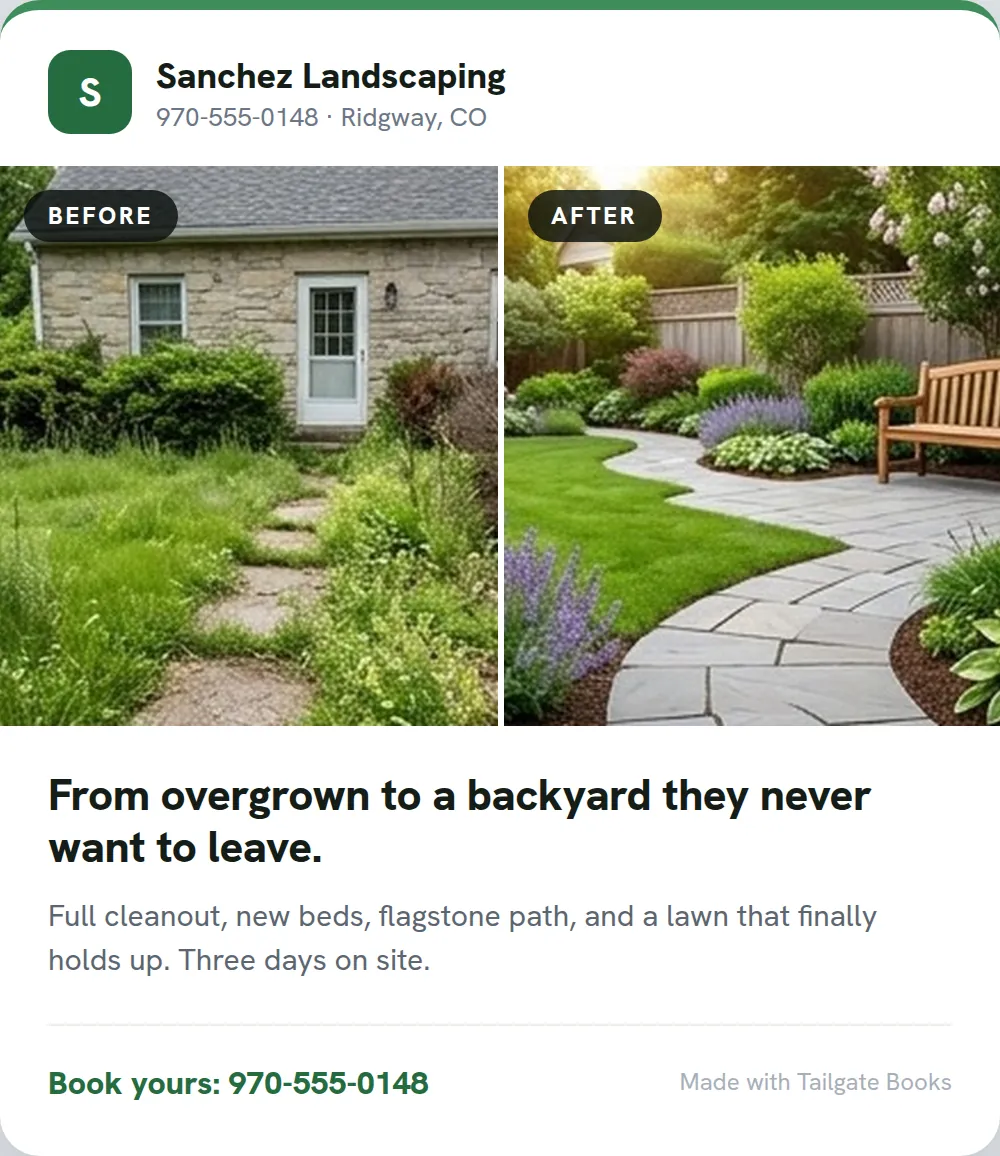
Snap the before. Snap the after. The app pairs them into a clean card with your name and your colors on it, ready to text the customer or post to win the next one. The same photos ride on the invoice, so the work you already did doubles as your marketing. No design app, no editing, done by the time you are off the ladder.

Paired for youin the order you shot them, before next to after
Your brand, not oursyour logo and your colors on every card
One tapsend it to the customer, save it, or post it
An example before and after card, with AI-generated photos of an overgrown yard turned into a landscaped backyard.
Example card. The photos were made with AI.

Our security promise.

This is your customer list, your prices, and photos from inside people’s homes. Here is exactly how it is guarded.

  • Card numbers never touch your phone or our servers. Card payments run through Stripe, the same company that handles cards for millions of businesses.
  • Your money goes straight to you. When a customer pays by card, it lands in your own Stripe account and pays out to your bank. It never passes through us.
  • One account can never see another’s books. Every contractor’s data is walled off at the database itself, not just hidden on the screen.
  • Your books stay in the United States, locked up. Stored in U.S. data centers, encrypted on the way there and encrypted where they sit.
  • A stolen password isn’t enough. Turn on two-factor sign-in, and in the phone app, lock it with your face or fingerprint.
  • The estimate you text has no login. It opens over an encrypted link that search engines cannot find and that says nothing to anyone who does not already have it.
  • Photos and receipts stay private. The links to them are signed and they expire, so an old link is a dead link.
  • Nobody here opens your data without logging it. If we ever need to look at your records, to help you or to fix a problem, it goes in a log: who, when, and why.
  • We do not sell your data, and there are no ads in the app. Your records are never used to train AI. You are the customer here, not the product.
  • You are never locked in. Download every record and photo any time, or have your books emailed to you. And if you ever leave, we do not keep your books forever.

En español de verdad.

Every screen, and every estimate and invoice your customer gets, in real Spanish, not an English app with a setting buried in a menu. It was built in both languages from the first day, because the person doing the work reads one or the other, and so does the homeowner signing the estimate.

Ver esta página en español →

$24.95, one plan, and a price that will not creep up on you

  • No tiers. No “that feature’s on the higher plan.” No per-user pricing.
  • Straight talk: today it works for businesses in Colorado and Texas. Each new state is added only after its rules are built in, so the paperwork is right the day you start.
  • 14 days free. No card charged until the trial ends. Cancel in two taps.
  • Take your books with you any time. One tap emails you everything: spreadsheets and a full-history PDF.
  • And a promise: we’re not going to hike the price out from under you. (Xero raised every US plan on October 1, 2026. QuickBooks raised its Online Essentials, Plus and Advanced plans in August.)
Start your 14-day free trial
The mission

1,000 one-person businesses, out from under the paperwork, by January 2028.

That is what Tailgate Books is here to do. A thousand solo pros who get their nights back, feel calm about where the business stands, and look like the professional they already are. Every estimate built on your own rates, every invoice that gets paid on time, every April that passes without the knot in your stomach, is one of the thousand. Make yours one of them.

Michael Cox, founder of Tailgate Books.
Michael Cox, founder
Why I built this

Why I built Tailgate Books

I went out on my own for the first time in my twenties. Before that I'd only ever been an employee, and I didn't know what I didn't know.

I didn't know how to price beyond my own time. I didn't know what materials really cost me, or all the other expenses that come with running a business.

So I worked seven days a week. I never knew how much I was actually making, and it never felt like enough, because it wasn't. My prices were wrong. The taxes didn't get paid. Then came the fines and the penalties. It was a nightmare.

The worst of it wasn't the business. It was what it took from home. The games I missed. The practices. Not being there for my kids. Years of working in constant stress and anxiety.

Just imagine all of that and not having English as your first language.

I don't want that for anyone.

Right now a lot of people are losing their jobs, some of them to AI, and many will be working for themselves for the first time. Others have done it their whole lives and never had the right tools.

Tailgate Books is for both. It's so much more than doing your books. It's an operating system for anyone who's self-employed. In a few minutes a day it captures what your business really costs and really earns. Not just "I worked and got paid," but the whole picture. Are my taxes covered? Have I set enough aside? Maybe yes, maybe not yet. Either way, you know.

Knowing is what makes you safe. It's what lets you say: I can go to the game. I can take the day off. I can sit down and breathe.

That's why I built it. And that's why the goal is a thousand people: there are a thousand reasons I made this.

Michael Cox, founder, Tailgate Books

This April, be the one who isn’t sweating it.

Start your 14-day free trial
No card charged for 14 days. Set up in a few minutes, right from your phone.

P.S. The shoebox isn’t getting any emptier on its own. A few minutes a day, starting today, and this is the last April you spend digging through the truck.